Goals
Sprint 2 is where the real technical development work began. We had two goals for this sprint:
- Identify who will be implementing the physical changes (such as painting the floor)
- Actively update the Kanban Board
The overall focus for this sprint was improving out inter-team and team-client communication. There seemed to be gap between us and the client when trying to figure out who would actually do the work – like painting the lines or tagging each costume. As a team, we also wanted to make sure we were communicating often so ideas could be exchanged and improved.
Scrum Highlight – Sprint Planning
Sprint Planning takes place at the beginning of every sprint. The whole team gathers to decide on the work that will be done over the course of the two weeks. The Scrum Guide says Sprint Planning should be time-boxed to a maximum of four hours. Our Sprint Planning meetings usually took just 15 minutes! We had to move quick due to our time constraints for the project.
While choosing stories, we took into account the logical order to implement features and the difficulty of each story. We tried to take in an appropriate amount of work for each sprint, so that all of our chosen stories would be finished by the end of the two weeks. Of course, this didn’t always turn out how we predicted. Sometimes stories would need to be carried over to the next sprint, or client feedback would cause us to revisit a story from a previous sprint.
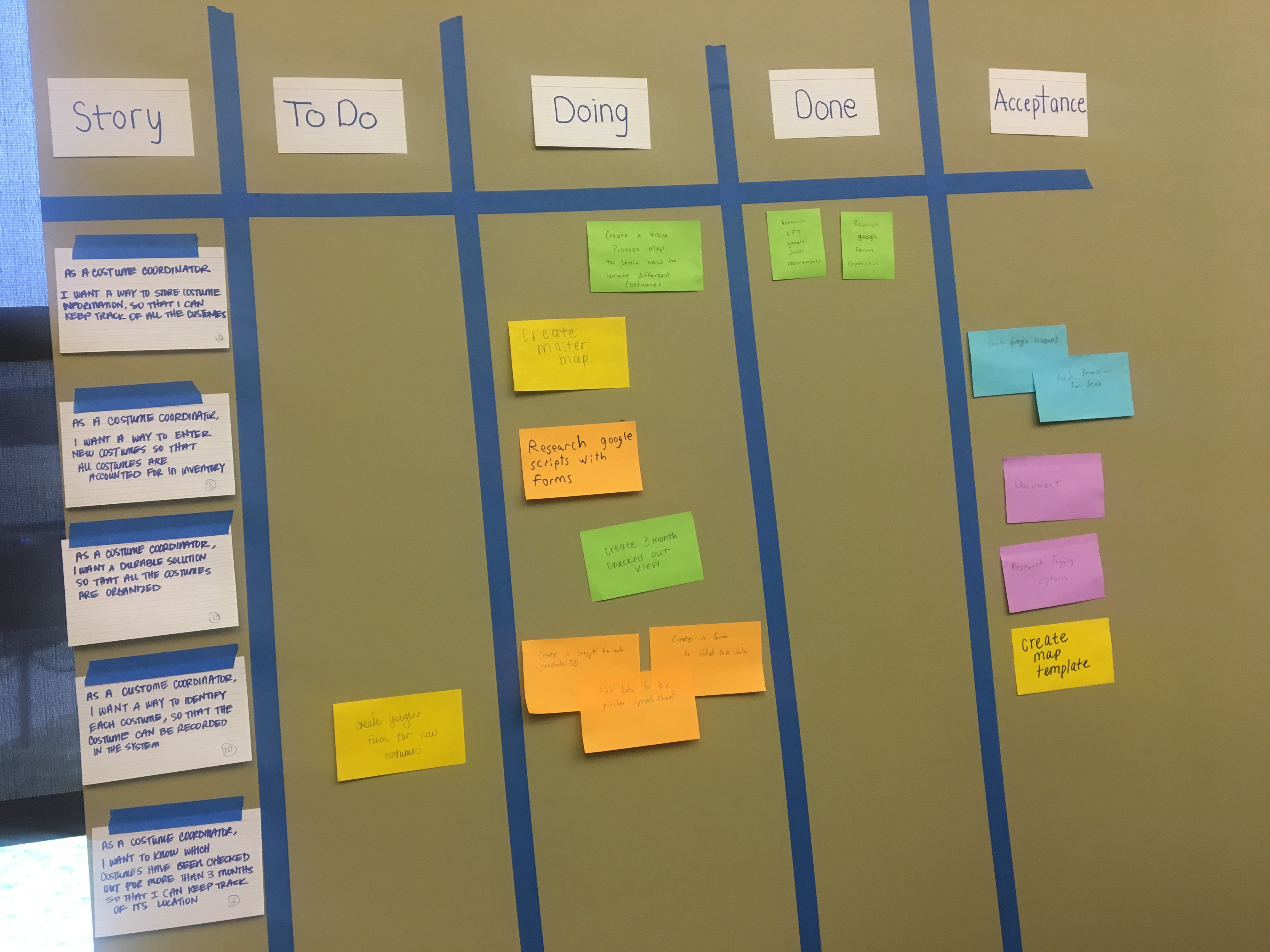
For this sprint, we chose to try and complete a form to add new costumes, create a few filters for the Costume Database, and to whip up some user-friendly documentation.
The New Costume Form
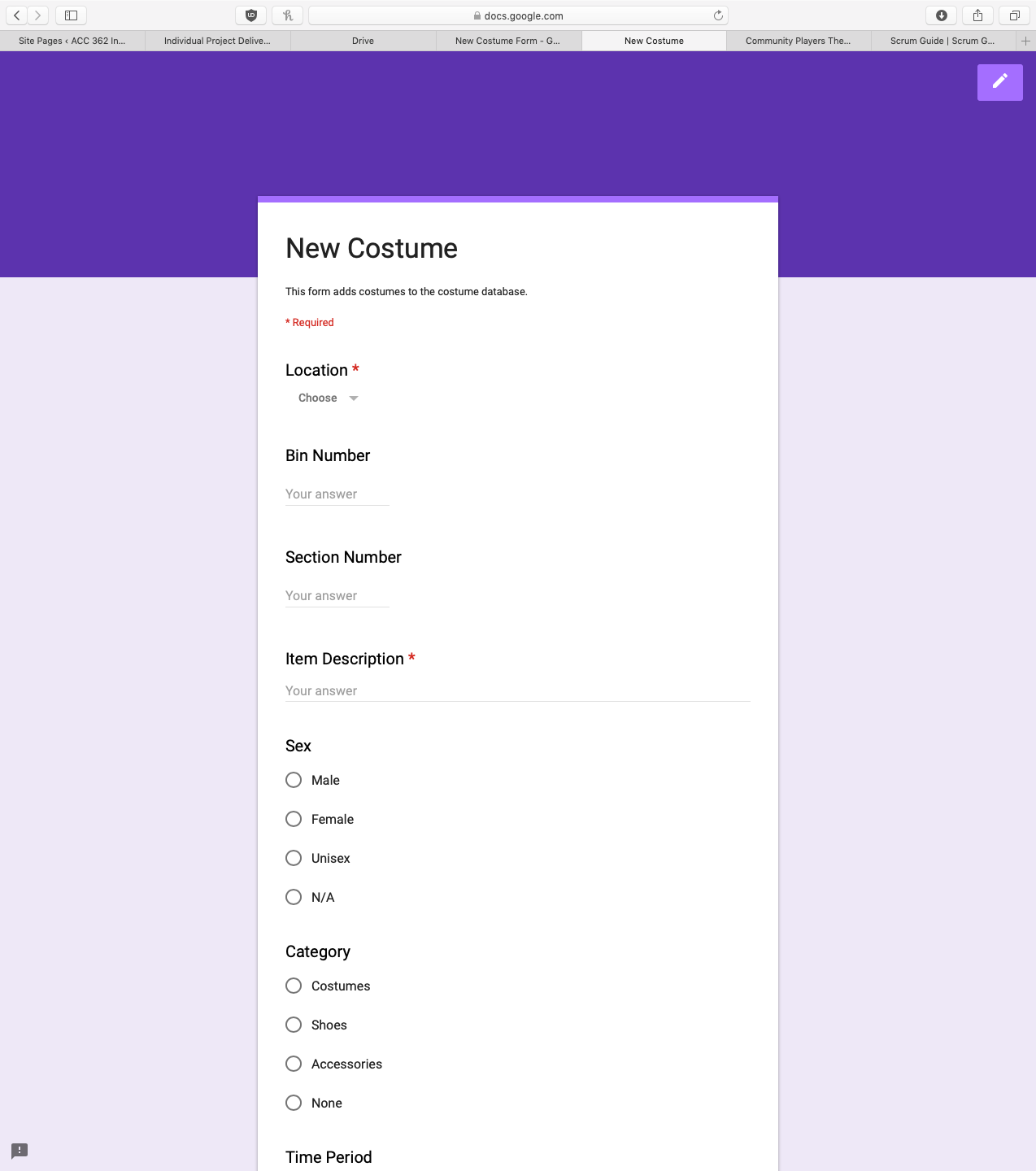
The New Costume form the first chance we had to get into the coding side of things. The New Costume form is a simple way to add costume records to our Costume Database spreadsheet. This allows the costume coordinator to add costumes from any device quickly and easily.
I lead the effort on this story with help from Andrew. Andrew created the form itself in Google Forms, while I started reading documentation on using Google Apps Script. As you can see here, the documentation is rather dense, but the language is essentially just Javascript. It took awhile to get the hang of it, but eventually Andrew and I got the form working.
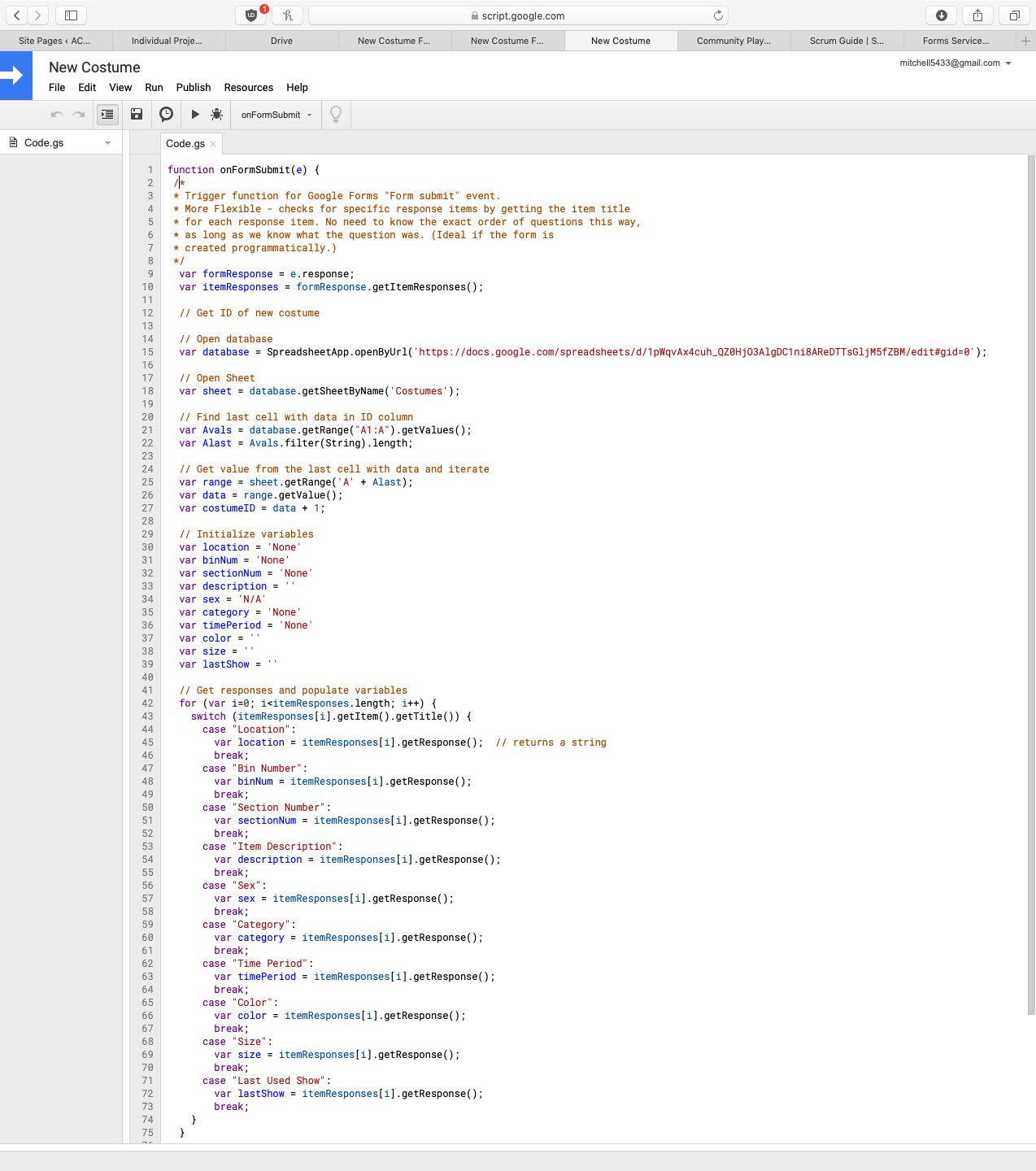
Here’s an example of some of the code I wrote. Google Forms is built to record responses out of the box, but we needed it to do more. As we learned in our Business Systems Analysis course, a software product will never meet 100% of the needs in a company. With the script I wrote, the Google Form now records new costume records in our Costume Database and assigns each costume a dynamic ID based on the previous record.
Filtering the Data
Christina and Silvia began researching and creating custom filter views for the Costume Database. These filters consisted of useful views, like seeing all male pairs of shoes or dresses from the 1970s. These views were saved to the document, so the costume coordinator could quickly drill down into the data.
Documentation
While we try to avoid unnecessary documentation as part of our Agile mindset, we are more than willing to create meaningful documentation. Tom and Zachary started making diagrams that walked the user through how to create their own custom filters.
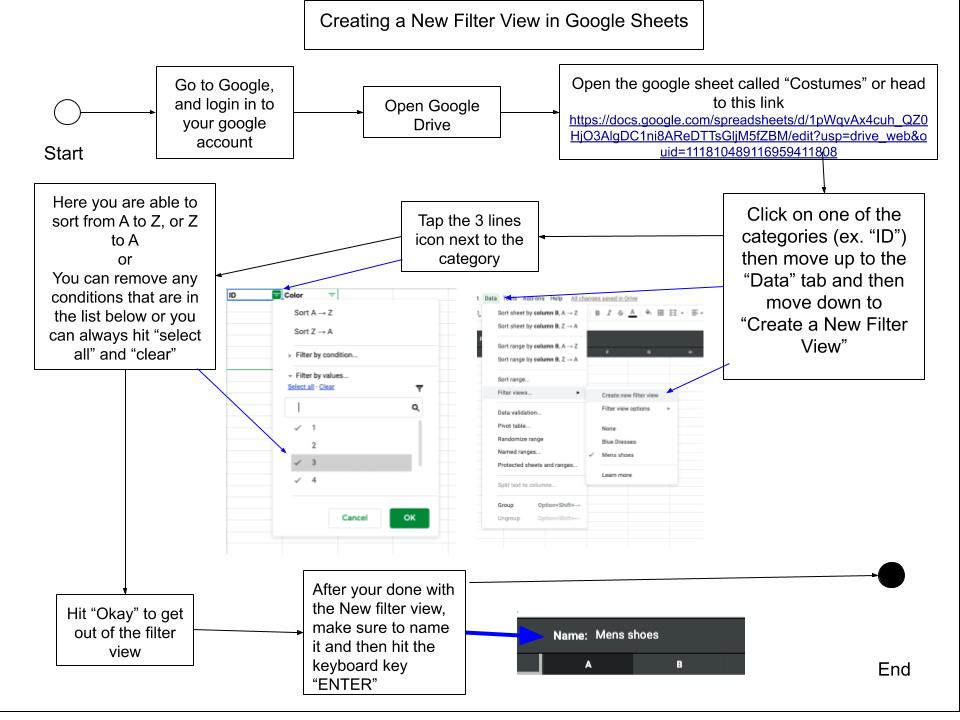
Notice how we tried to keep the instructions to just one page. We strived to create simple documentation that was straight to the point.
Sprint Review
We once again met at the theater for our Sprint Review. We were all excited to showcase our work and get feedback. However, we were missing one thing… the client!
Our client got caught up in her work and ended up missing our Sprint Review. That’s the problem with working with an organization staffed by volunteers: They all have daytime jobs that often take priority over the theater. And I guess you could say nursing is a little more important than inventorying costumes… Oh well! We were disappointed by this turn of events, but we couldn’t let it stop our progress. We practiced our Agility and instead carried on the review with the Props and Shop client in place of the costume coordinator. The Props and Shop client didn’t quite understand all of our progress, but he did his best regardless and gave us some feedback.
Sprint Retrospective
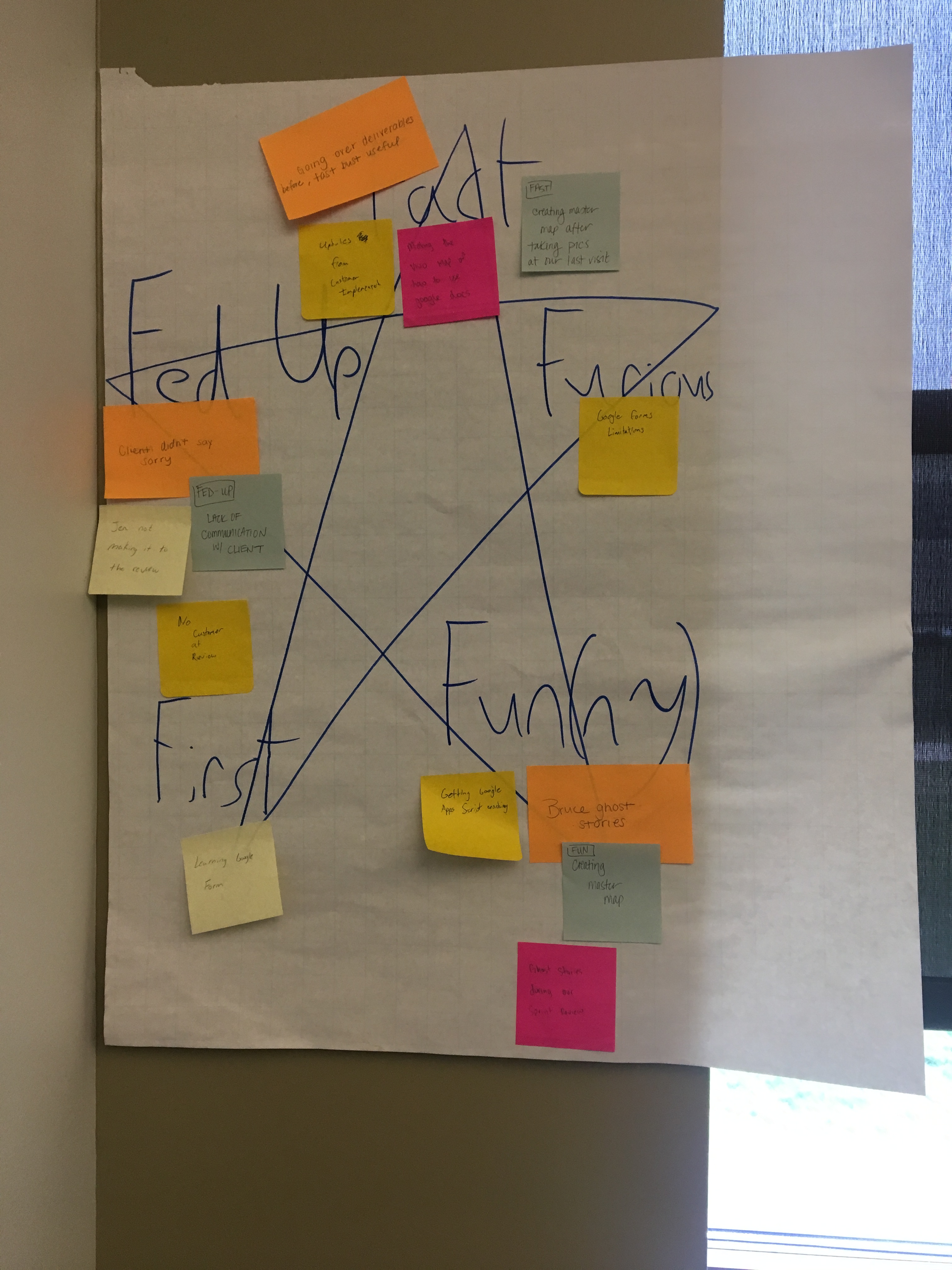
Andrew liked to switch up our retro activity each sprint. For Sprint 2, we used the Fast, Furious, Fun(ny), First, and Fed Up activity. Each Scrum Team member wrote down a thought on a sticky note for each of the five categories. We then discussed everyone’s answers.
Perhaps predictably, the biggest issue was that our client had missed the Sprint Review. To remedy this, it was decided that the Product Owner would be responsible for sending our client a reminder the day before each scheduled meeting.
Other areas of interest included excitement with coding, praise for responding to customer feedback, and a mutual enjoyment of our Prop and Shop client’s theater ghost stories. The retro really does include thoughts from all across the board!
Mitchell Milestone
Before this sprint, I had never done any work with Google Apps Script. Unfortunately much of what I learned with the Google Suite will not translate directly to my future full-time job, as G Suite is actually blocked at State Farm for security reasons. However, I did get plenty of practice with learning on the fly. I can use this and my newfound Javascript knowledge to possibly automate some repetitive processes at work. Being able to wade through heaps of code documentation is a valuable skill in almost every tech position.
I was just as disappointed as the rest when out client didn’t show, and as the Product Owner, that was partly my fault. In hindsight, I wasn’t communicating with the client frequently enough. Another part of the issue is that our only contact with the client was through email. Lesson learned: In future projects, I should always require the client provide multiple forms of contact. This experience was good practice for working with clients in the future.
As they say in the biz, the show must go on! Click on to Sprint 3.

